Inside WordQuest: How the Game Actually Works
When people hear "educational game," they usually picture flashcards with cartoon characters. WordQuest is something different. It's an actual game — a top-down adventure where a small hero explores an island, opens treasure chests, and clears blocking trees. The twist is that reading IS the mechanic. Every obstacle in the game requires identifying a letter or word to progress.
If you're a parent trying to understand what your child is actually doing when they play, here's the full breakdown.
The Overworld Map
When your child launches WordQuest, they see an overworld map. Think of it like the level select screen in a Mario game — a path winding through a world, with nodes representing each location. Completed locations are marked as done, and the current one stands out so your child knows where to head next.
Your child taps an available level to enter it. When they complete a level, they return to the overworld and the hero character walks along the path to the next node, which unlocks automatically. This travel animation is a small thing, but kids love it — it gives a genuine sense of journey and progression.
The overworld doesn't require any reading or challenge-solving. It's purely navigation. Your child taps where they want to go.
Inside a Level
Each level is a small, self-contained world viewed from above. The hero character stands in a colorful environment — the Misty Isle has trees, grass, paths, and water. Your child moves the hero using touch controls on mobile or arrow keys on desktop.
The world is designed for exploration. There are paths to follow, areas to discover, and obstacles to encounter. The hero walks in four directions — no jumping, no complex platforming. This is intentional. Jumping mechanics frustrate children under five. Top-down movement is intuitive for even the youngest players.
Scattered throughout each level are interactive obstacles: fallen trees that block the path, treasure chests with rewards inside, bridges that need activating. Each of these triggers a reading challenge when the hero reaches it.
How Challenges Work
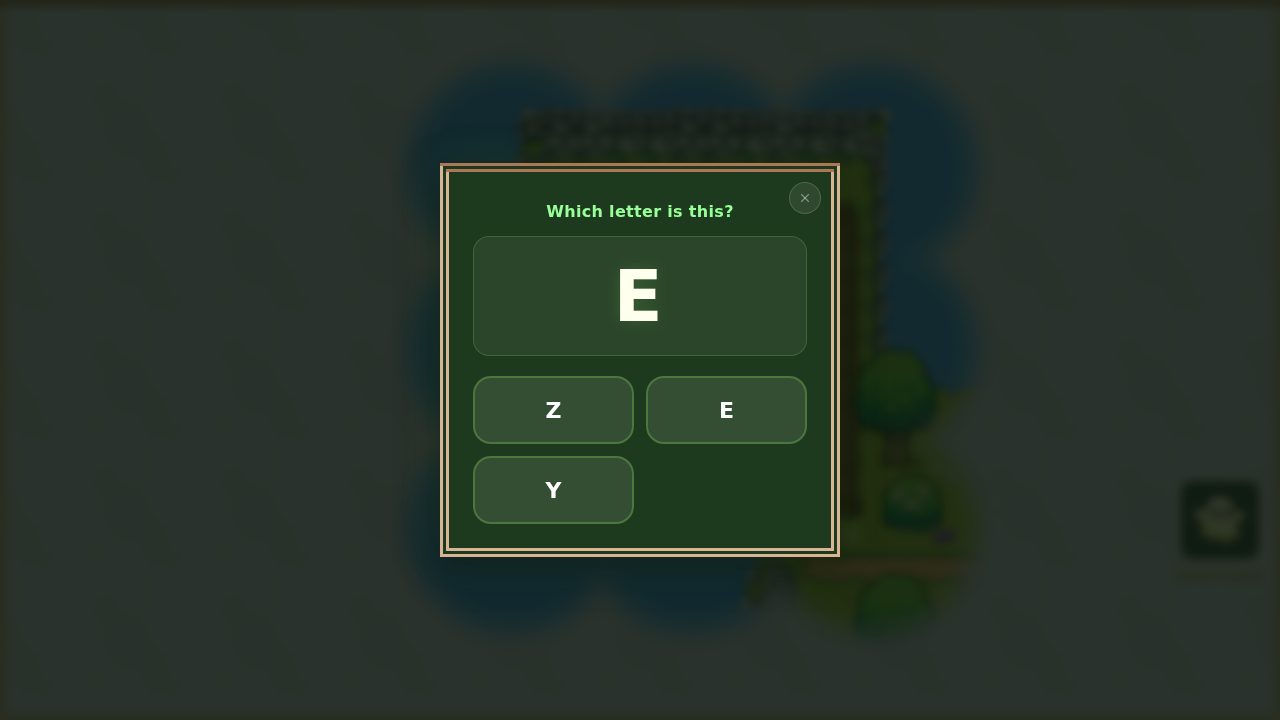
When your child reaches an obstacle, a small "Press E" prompt appears beside it — or, on a touchscreen, a glowing E button in the corner. A single press (or tap) opens the challenge. Here's what happens:
In Explorer mode: A single letter appears with a few options to choose between — and the number of options grows as your child gets more confident. Your child taps the letter they think is correct, and the game says it aloud when they get it right. (We use both phonics and sight-word approaches together — here's why both matter.)
In Reader mode: A whole word appears with a few options. Your child taps the matching word, and the game reads it aloud when they get it right.
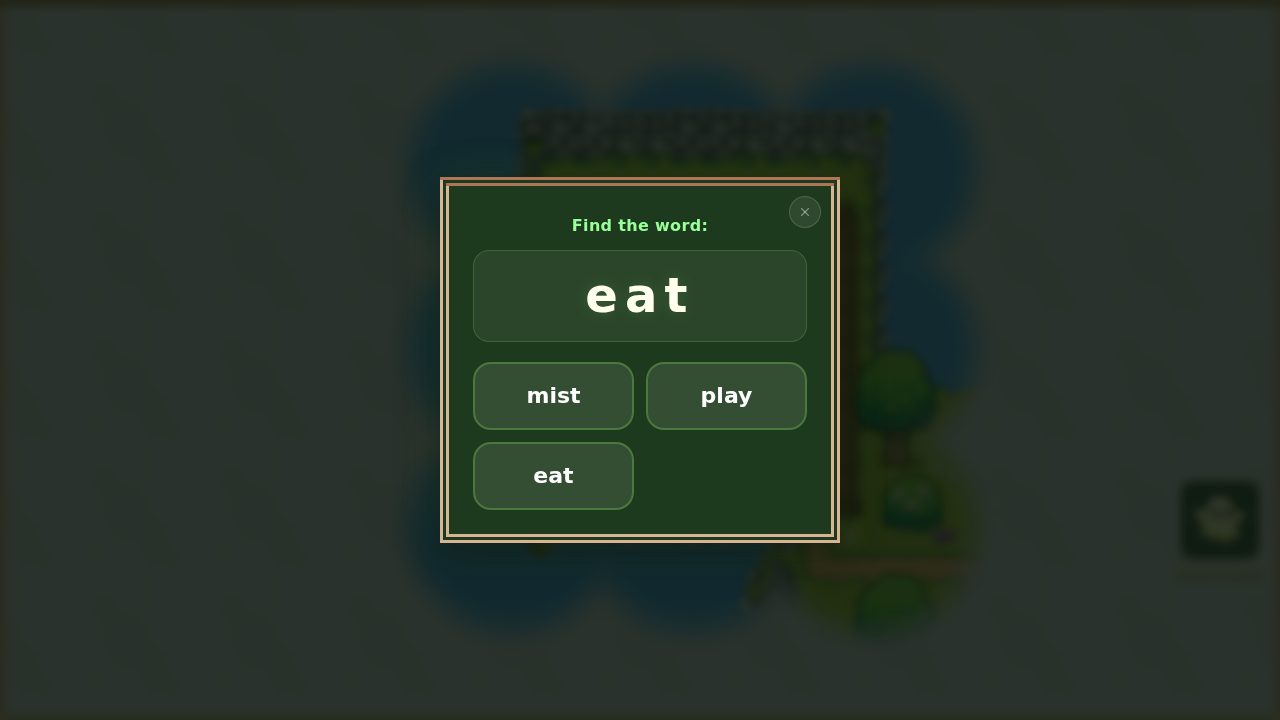 Reader mode — a whole word to find among a few options.
This is the core of WordQuest — the reading IS the game. Your child isn't being quizzed between levels of a completely unrelated game. The reading challenge IS what clears the path. It IS what unlocks the treasure. The challenge and the game are the same thing.
Gentle Failure
This is one of the design decisions I'm most proud of as a parent. When your child taps the wrong answer, here's what happens:
- The screen gives a gentle shake
- A soft sound plays (not a buzzer, not an alarm)
- The same options remain on screen
- Your child can try again immediately
There is no penalty. No lost lives. No countdown timer starting. No "wrong!" announcement. The child is simply invited to try another option. Many children will get the right answer on their second or third attempt, and when they do, the same celebration plays as if they'd gotten it on the first try.
This matters enormously for children between three and seven. At this age, a harsh failure response doesn't motivate them to try harder — it makes them not want to try at all. Gentle failure keeps the child in the game, keeps them attempting, and builds the confidence that eventually leads to getting answers right the first time.
The one playful exception is fishing: pick the wrong word (or dawdle too long) and the fish wriggles off the hook and swims away. That's not a punishment — it's part of the joy of fishing, and kids get it instantly. Nothing is lost, and the very next cast brings another bite and another word to catch.
Multi-Sensory Learning
Every challenge in WordQuest fires multiple senses at once:
Visual: The child sees the letter or word on screen, alongside the options.
Auditory: When your child answers correctly, the game says the letter or word aloud — reinforcing the link between the shape on screen and the sound it makes.
Tactile: The child physically taps their answer. This motor action creates an additional memory pathway.
This multi-sensory approach is backed by research on early literacy. Seeing a letter, hearing its sound, and physically selecting it creates three connections in the brain simultaneously. Over time, these connections become automatic — the child recognizes the letter or word without consciously thinking about it. That's fluency. (We go deeper on the science of why reading games work in a separate piece.)
What Your Child Encounters
As your child explores the Misty Isle, they'll encounter:
- All 26 letters of the alphabet (Explorer mode)
- A growing set of Dolch sight words — the high-frequency words like the, and, here, you that early readers learn to recognize on sight (Reader mode)
- Simple CVC words to sound out — cat, dog, sun, hat, and plenty more (Reader mode)
- Multiple obstacle types: blocking trees, treasure chests, bridges
- Celebration animations on correct answers — a cheerful flourish and a happy sound
- A satisfying sense of progress as each location is completed and more of the map opens up
Each letter and word appears many times, in different places and on different obstacles. This repetition is deliberate — it's how recognition builds. Your child might meet the letter B on a tree in one spot, a treasure chest in another, and a bridge further on. By the third or fourth encounter, many children recognize it before the audio even plays.
The Misty Isle
The Misty Isle is WordQuest's first world, and it's completely free. At heart it's a top-down exploration adventure — the kind of game where you wander a world, meet characters, and discover what's around the next corner — except here, every blocked path and every obstacle opens by reading.
It's built to open up gradually. The first stretch is deliberately simple: walk a short path, read a letter or a word, and watch the way clear. That's all a brand-new player needs. As your child explores further, the island gives them more to do — friendly characters with little quests, a pond to fish at, garden patches where things grow, items and tools to collect and use, and small reward games to unlock along the way. Nothing is dumped on them at once; each new thing appears as they're ready for it, so the game grows with the child instead of overwhelming them.
The mist is part of that. Much of the island starts hidden under fog, and it rolls back as your child explores — so there's always a little more world appearing, and a clear sense of I made that happen. Reading is what pushes the fog back.
After the Misty Isle, additional worlds will unlock for families who want to keep going — new places, new words, and new things to do, with the same core mechanic at the center. Every setting that controls difficulty, audio, and session length is documented here if you want to fine-tune the experience for your child.
For Parents Who Are Curious About the Tech
WordQuest is a web-based game that runs in your browser. It's built with Phaser, a professional game engine used by thousands of games. It works on phones, tablets, and computers — anywhere with a modern web browser. It's also installable as a Progressive Web App (PWA), which means you can add it to your home screen like an app — no app store, no download.
No app store download required. No installation. Just visit the site and play.
Want to see it in action? The Misty Isle is completely free. Your child can start playing in under five minutes. Launch the game.